

Contents
An autonomous agent can keep working without a person sending every prompt. Something still has to start the next model call. A timer, an incoming message, or a changed file can do that. The agent also needs a record of what it was doing, so the next call can pick up the same work.
The execution cycle
An agent can stop running while its task remains unfinished. It might be waiting for a reply, a new document, or tomorrow's data. A program can start the agent again when that information arrives, using the saved task and recent work as context. The agent loop handles the work within each run; this extra code connects one run to the next.
The agent needs to save enough information for the next run to continue: what it finished, what remains, and what it is waiting for. The wake helper below loads the saved task and gives it to the agent along with the event that woke it. The saved result includes what to do next. A timer or event handler can use that result to arrange another run.
// These helpers stand in for your application's code.
async function wake({ taskId, event }) {
  const task = await tasks.load(taskId)
  if (task.status === "complete") return

  const context = await reconstructContext({ task, event })
  const result = await runAgent(context)

  await tasks.recordRun({ taskId, event, result })
}
// The saved result says whether to run again,
// wait for a time or event, or finish the task.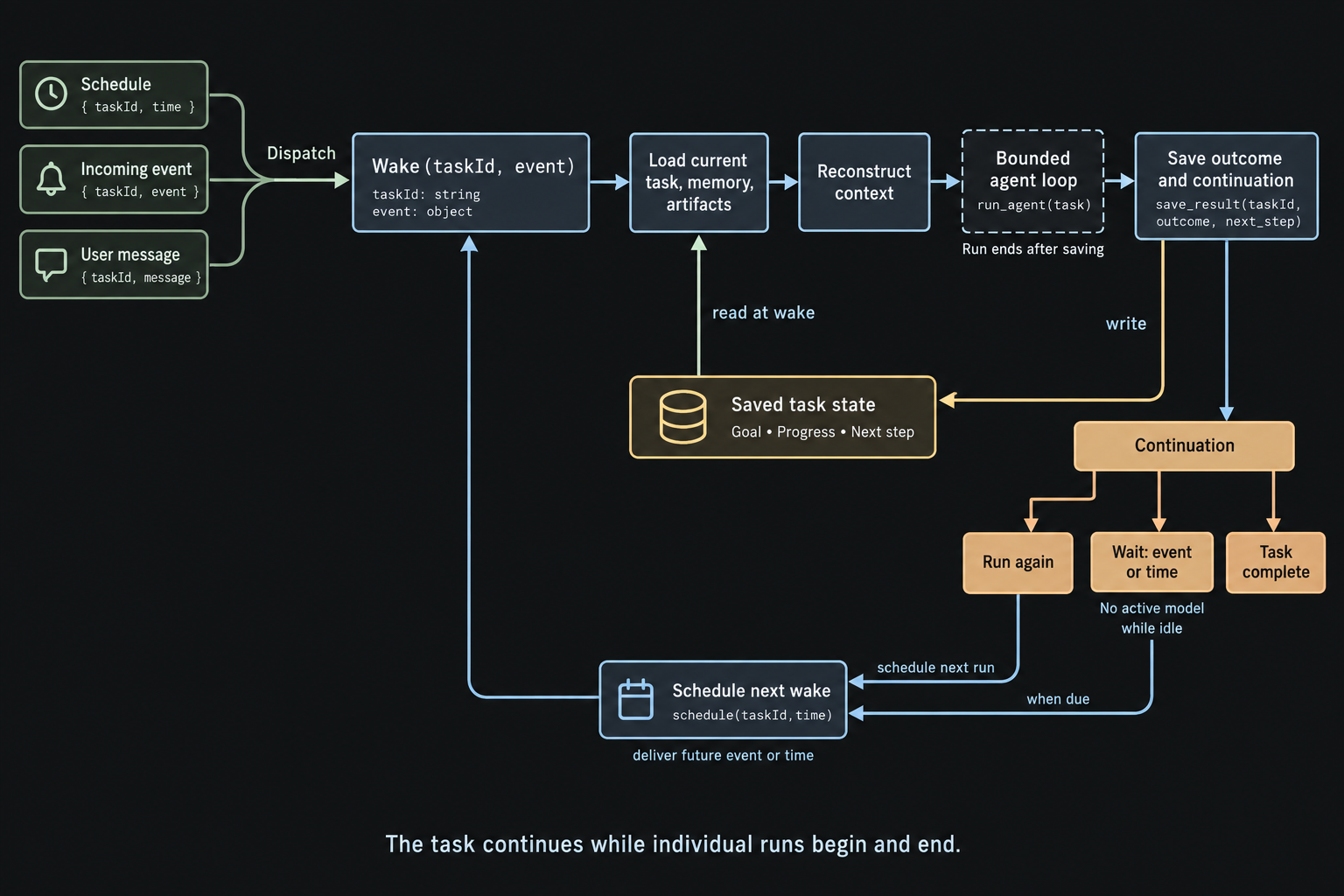
Triggers
An agent can wake when something changes. A draft marked ready for review gives a reviewer work to do. Starting that reviewer after every file edit would also wake it for changes unrelated to its task. Choosing the trigger determines which changes get the agent's attention.
Applications can receive or discover changes in several common ways:
- Webhooks. Another service sends your application a message when something happens.
- File watchers. Your application watches selected files or folders and receives notifications when they change.
- Polling. Your application checks a service regularly for changes. This is useful when the service cannot send updates itself.
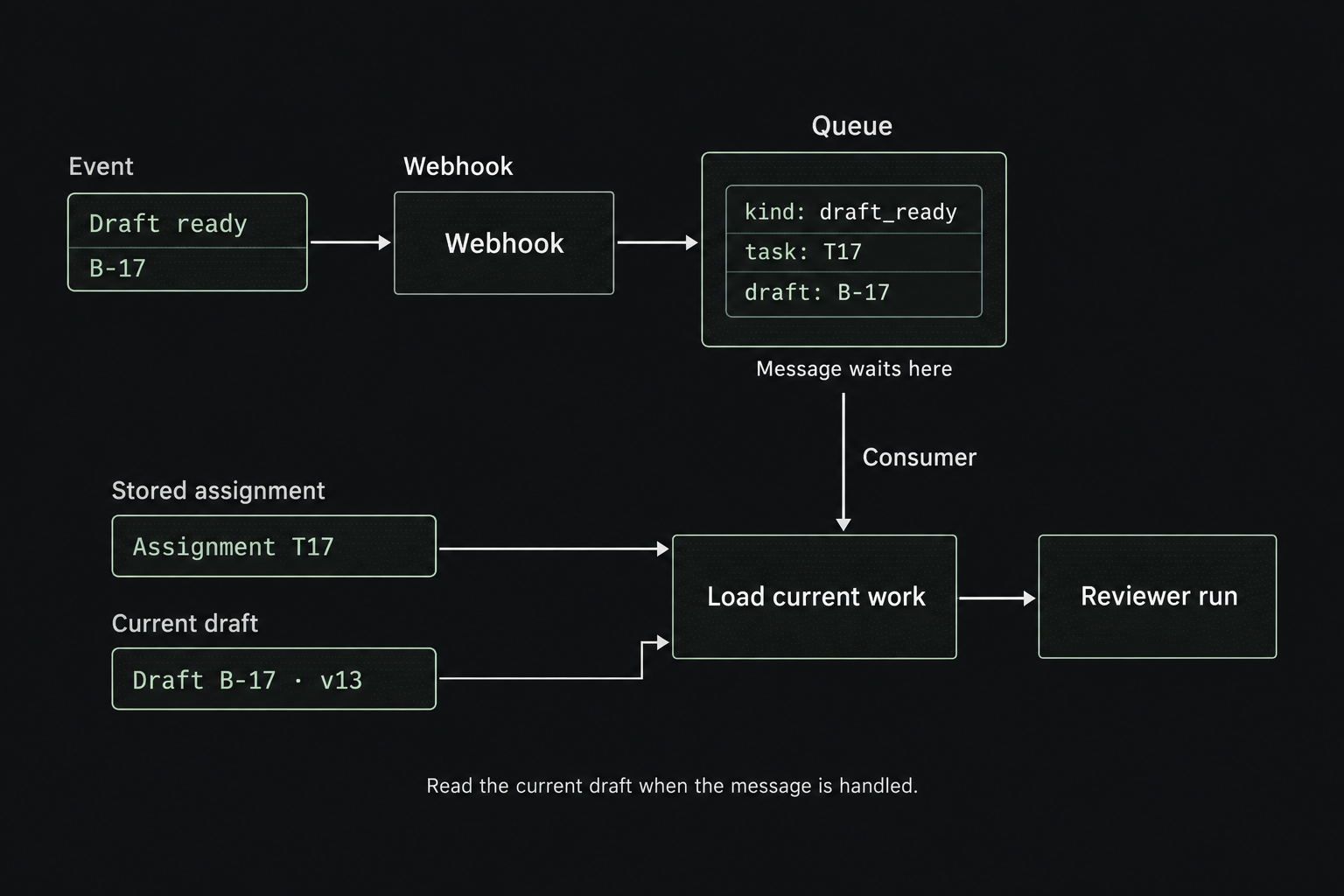
If the agent cannot handle an event immediately, a queue can hold the message until it is ready. A message such as { taskId, kind: "draft_ready", draftId } identifies the work. The program uses taskId to load the saved assignment and gives the agent draftId so it can read the draft. Reading the current draft matters because more edits may have happened while the message waited in the queue.
The Heartbeat Pattern
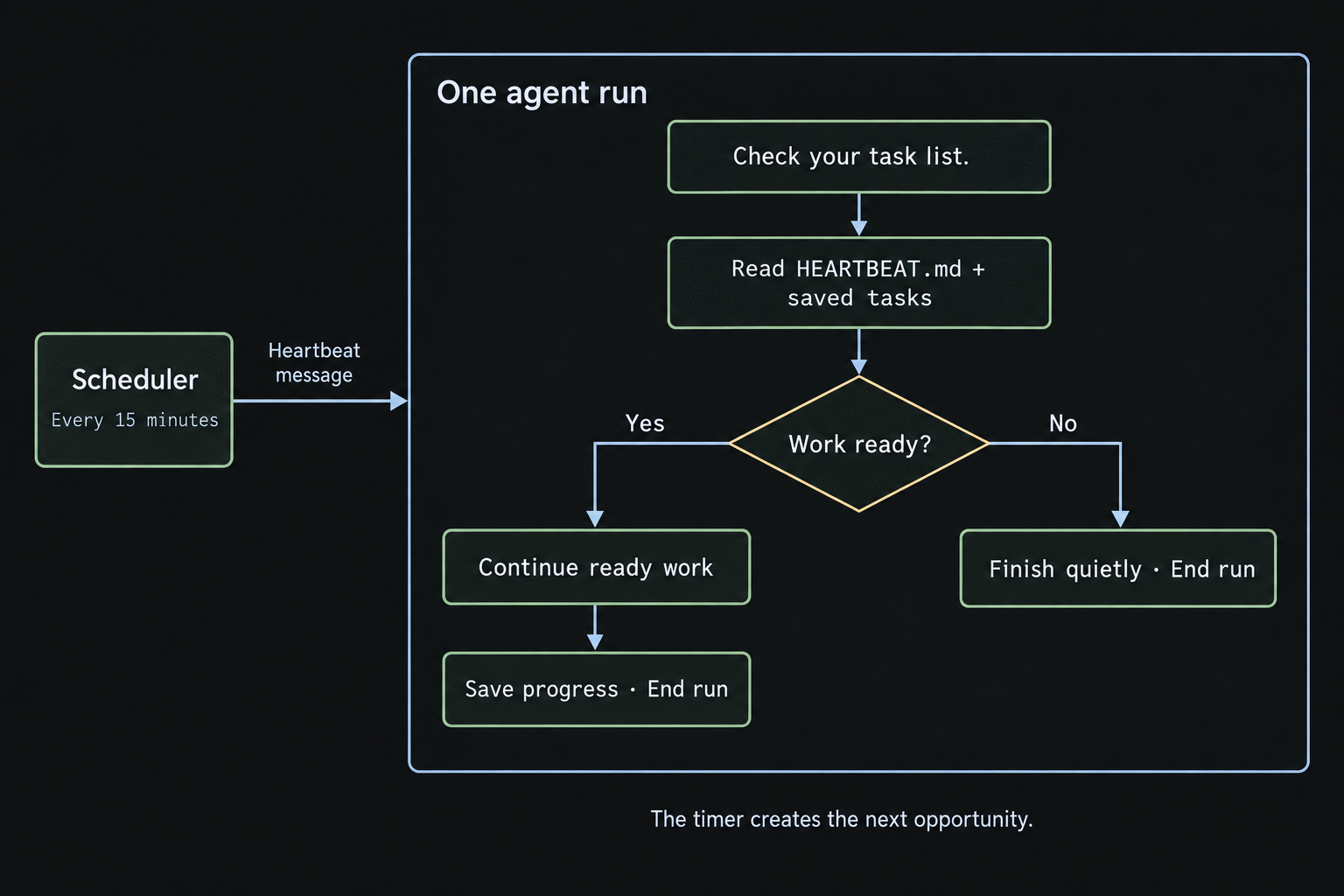
A heartbeat can be as simple as a timer that sends the agent a message every 15 minutes: “Check whether any new sources change the briefing.” That automated message starts an agent run, just as a user message would. The agent can use its usual tools to check for updates and do the work.
The message can also leave the choice of work to the agent: “Check your task list and continue anything that is ready.” A file such as HEARTBEAT.md can hold standing instructions about what to check. The agent reads those instructions and its saved tasks, then decides what needs attention. If nothing needs doing, it can finish quietly.
// The scheduler stores this repeating job and calls wake.
await scheduler.every("15 minutes", {
  handler: "wake",
  payload: {
    taskId,
    event: {
      kind: "heartbeat",
      message: "Check your task list and continue anything that is ready.",
    },
  },
})
The timer keeps time; the model does not have to keep thinking between checks. Shorter intervals catch changes sooner but cost more if they keep finding nothing new. Events can wake the agent for known changes, while a heartbeat gives it a regular chance to notice unfinished work. The agent does not need to send the user a message every time it checks.
Context reconstruction
“Check your tasks” is only useful if the agent can find those tasks. The next model call needs the goal, relevant notes, and access to the current work. The program can include a short summary in context and let the agent read more from files or databases. This is the same memory problem from earlier chapters.
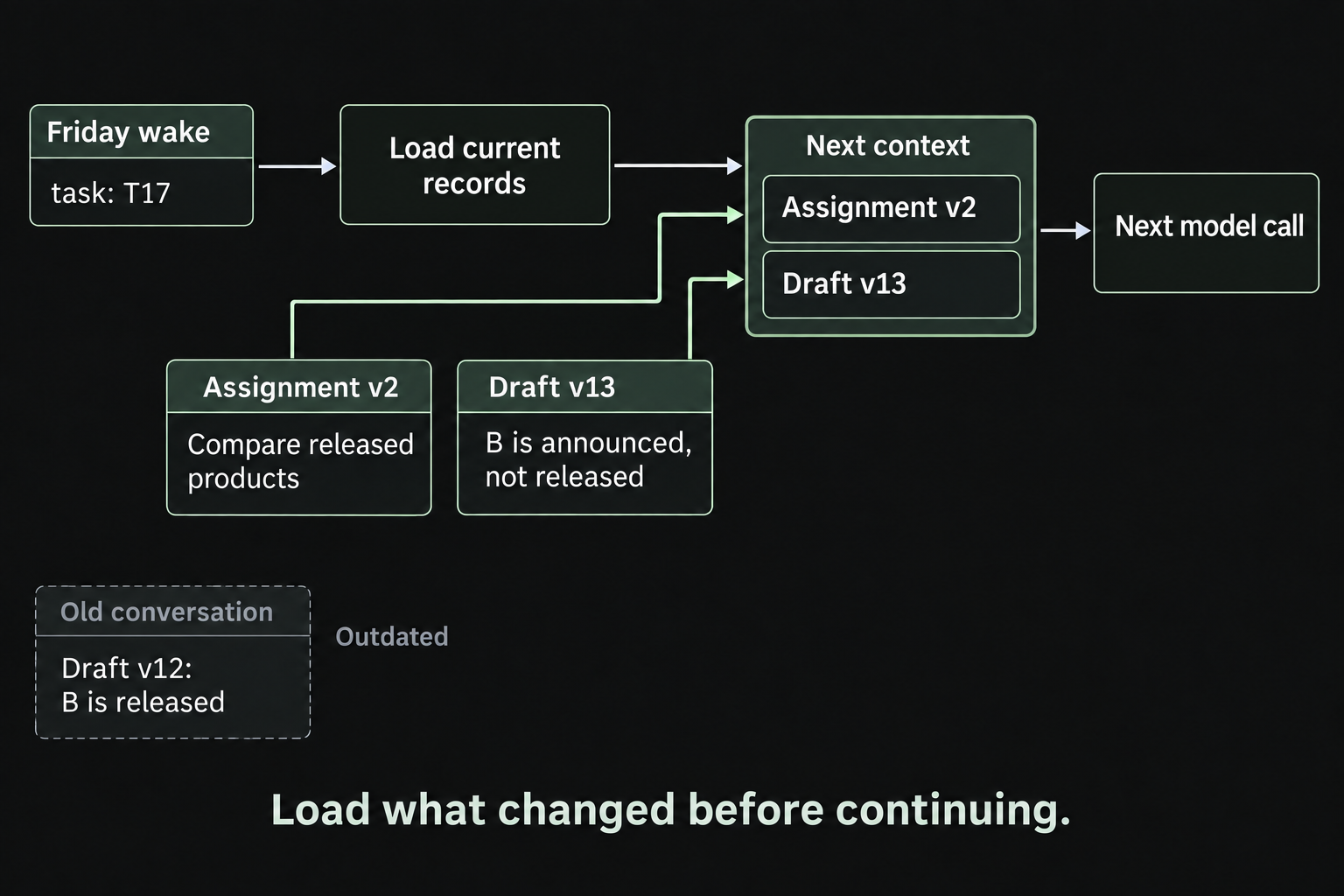
The last conversation may no longer describe the current work. Another agent may have edited the draft, or the user may have changed the assignment in a different thread. Replaying the old conversation alone can leave the agent working from outdated information. Saved history explains earlier decisions; current files and task records show where the work stands now.
Commitments need records too. If the agent promises to check again on Friday, the system needs to save both the reminder and a scheduled wake-up. Friday's model call can then recover what to check and why. Those saved records let the agent remember the commitment and follow through.
Continuity across threads
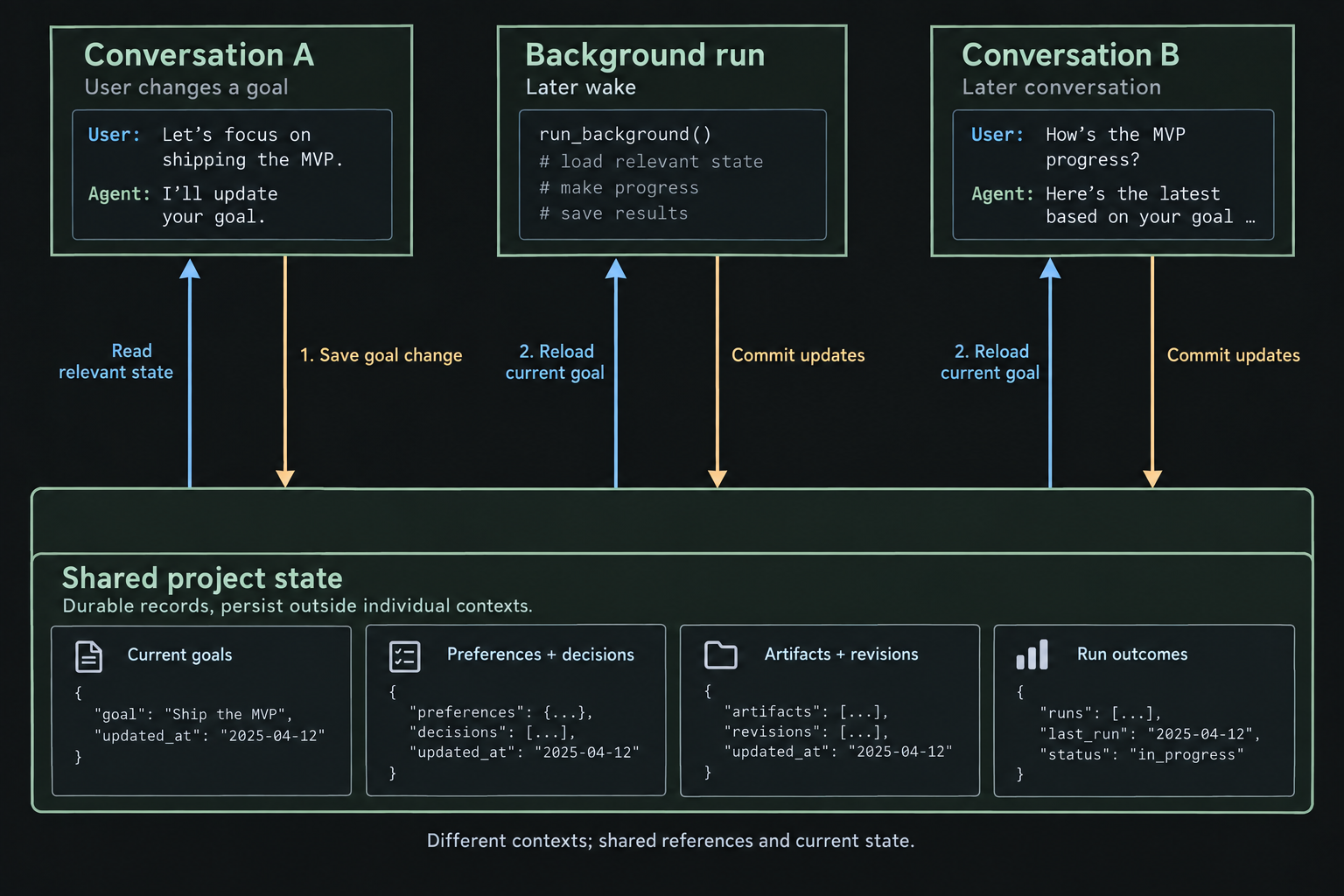
Two conversations with the same agent can have different histories. Background jobs may have their own histories too. If a decision stays inside one conversation, other runs will not know about it. Shared notes and task records let separate conversations and background work stay connected.
If the user changes a research question in chat, the agent should update the saved assignment that background jobs read. If a background job finds conflicting evidence, it should save the finding where a later chat can retrieve it. Information needs to travel both ways for the system to act like one agent that knows what it has been doing.
Each call still needs only the information relevant to its work. Task details can stay with the task, lasting preferences in a user profile, and findings beside their sources. Shared task and project identifiers help each run find the right records. When several agents edit the same record, the version checks from Artifacts help prevent one update from overwriting another.
Follow-ups
A check can finish while the larger task continues. An agent monitoring sources may find nothing new today and still need to check tomorrow. It can also choose a useful time to return, such as after an expected release. A scheduling tool can save that request and arrange the wake-up. Writing “I will check tomorrow” in a response does not set a timer.
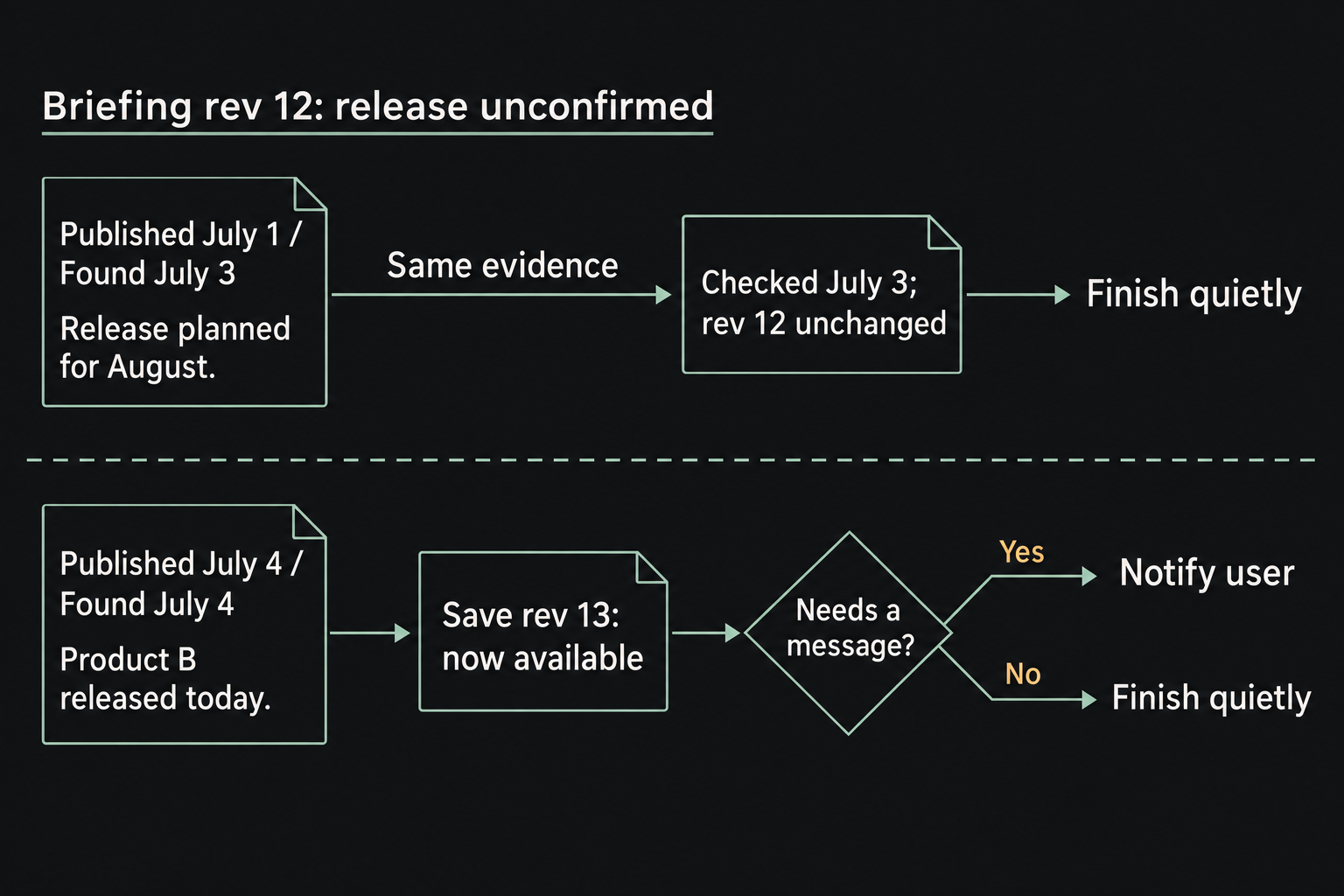
New to the agent does not always mean new to the task. A source found today may describe last week's events or repeat evidence already in the briefing. Recording when a source was published and when it was checked helps the agent tell a new finding from a real change. An uneventful check can simply record that the work is still current.
Saving work and notifying the user are separate choices. The agent can update a note quietly and send a message when a finding changes the conclusion or needs a decision. The next conversation should be able to recover the saved result either way. Frequent checks can be useful without becoming frequent interruptions.
A timer can keep an agent checking, and shared records can help it pick up where it left off. We now have a system that can keep working between conversations. The next question is how to tell whether that work is any good.